This page is the long version. The Apple Silicon notice has the short one, plus a checker that answers your exact product — most readers need nothing else. If you want every case written out, read on.
One detail worth knowing when you upgrade to macOS 27 Golden Gate (Apple shipped it on September 14, 2026): the upgrade removes Rosetta from the Mac, and macOS reinstalls it automatically the first time an Intel app needs it. So the first launch of Graphite v13 SE after that upgrade may take an extra few seconds to a few minutes — that is Rosetta being reinstalled, not the software failing.
Cobalt, Xenon, Argon — which build are you on?
Current v12 builds are native Apple Silicon applications. Apple Silicon support arrived in build 1204.200, and 1204.219 is the build to be on. If that is you, none of this applies — the alert cannot even appear for those builds. Open the application and check its build number; if it is below 1204.200, you are on an Intel-only build, and one of three situations fits:
You simply have not installed the updates
By far the most common case, and the easiest: install the current build. It is free, it is already covered by your subscription, and it removes the issue completely.
Your Mac cannot run macOS 12 Monterey
The 200 series needs macOS 12 Monterey. If your Mac cannot reach it, build 1204.98 is the answer — it runs from macOS 10.14 Mojave onwards, and it is a normal, supported download for Cobalt, Xenon, Argon and Lithium (Cobalt Share on request). What you give up: for Cobalt, Xenon and Argon it has no PhotoRender, no Animation and no Parasolid import; for Lithium and Cobalt Share, nothing at all. Being on 1204.98 because your Mac needs it is a legitimate setup, not a state of being behind.
You are running Heritage Edition — on purpose
You can already run the current 200-series builds, where Apple Silicon is fully supported — the same subscription covers both. You keep Heritage Edition around for the few things not yet in 1204.219: PhotoRender, Animation and Parasolid export. And those are coming to the current builds before the end of October 2026 — rendering on Cycles rather than Lightworks — which will remove the last reason to reach for the older build. Until then, running both is a setup we know and support, not something this page asks you to abandon.
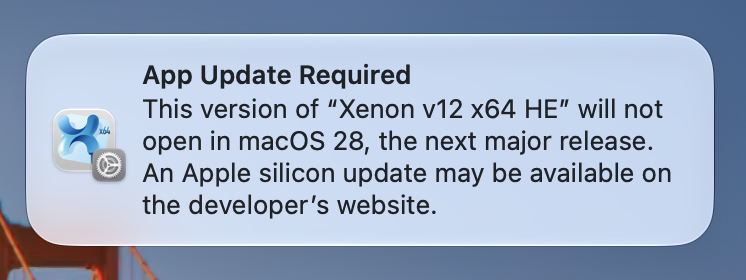
Two more things worth knowing: on an Intel Mac, Rosetta was never part of your setup — Heritage Edition runs natively there and none of this applies. And Heritage Edition is no longer distributed — if you already have it you keep it and it stays supported, but we cannot issue it to anyone who does not already hold it. If this is your situation, talk to us directly rather than working it out from this page.
Graphite 27 is the answer — and it is close
Graphite 27 does not use Rosetta at all. Every Apple Silicon Mac ever made can run it, along with most Intel Macs from around 2015 onward. The one requirement worth knowing is macOS 12 Monterey or later — the checker on the main notice tells you exactly where your machine stands.
Active subscriptions transition to the 27 releases at no additional charge.
Graphite 27 arrives before the end of October 2026.
And if you need an earlier release instead — Graphite v12 is the better fit on macOS 10.13 High Sierra or 10.14 Mojave — active subscribers can have one on request. We would rather you be on the release that fits your machine than on the newest one.
Older Intel Macs — the one real gotcha, and it is a mild one
Older Intel Macs — broadly 2012 to 2014 — cannot install macOS 12 Monterey. Apple set that limit, so Graphite 27 will not reach those machines.
Nothing stops working. Those Macs keep running today's release for as long as you want to run it.
In fact this group is in the calmest position of all: Rosetta only ever existed on Apple Silicon, so on an Intel Mac Graphite v13 SE runs natively and none of Apple's Rosetta milestones apply at all.
What to do, depending on where you are
Using Graphite v13 SE today, and it works
Carry on. Nothing to do.
I just want the message to stop
Install the profile — three steps, reversible, and it changes nothing else. Turning the alert off →
Thinking about a macOS upgrade
Check your combination in the main notice's checker first — it will tell you whether your macOS is above or below what you need.
Buying a new Mac in late 2027 or later
Talk to us before you install. By then Graphite 27 is the release you will want, and we will make sure you have it.
On an Intel Mac from 2016 or earlier
Nothing to do, and nothing to worry about. Your setup is unaffected by every date on the main notice.
Questions?
If your situation is not on this page, or you would rather talk it through than read another word, talk to us. We would rather answer a question early than have you plan around a guess.
Vellum Investment Partners, LLC, dba Ashlar-Vellum · 800 877-2745